

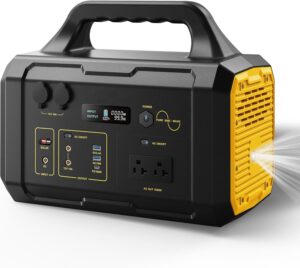

So you’ve got a 1000W power station – how do you make the battery last as long as possible, and what should you know about inverter efficiency and power drain? Let’s dive into some tips and insights on getting the most out of that watt-hour capacity.
Understand Inverter Efficiency: Inside your power station, the inverter turns battery DC power into the AC outlets you use. It’s not a 100% perfect conversion – most inverters are about 85-90% efficient. This means if you draw 1000W out of the AC plug, the battery might actually be delivering ~1100W internally (wasting ~100W as heat). Why does this matter? Because it affects how long your battery lasts. For example, a “1000Wh” battery effectively gives maybe 850Wh of usable AC power once you account for inverter losses. If you run a 100W light, expect closer to 85W-hours from the battery per hour of use due to this overhead. The upshot: Don’t be surprised if your 1000Wh station behaves a bit more like ~850Wh in real AC usage – that’s normal. Some high-quality units advertise their efficiency; others you infer from run tests. Tip: When possible, use DC outputs (like the 12V car port or USB ports) for DC devices – bypassing the inverter can save energy. For instance, running a 12V fridge from the 12V outlet is more efficient than via an AC adapter.
Idle and No-Load Drain: Inverters also consume some power just by being on, even if nothing is plugged in. This “tare” draw might be small (maybe 5-10W) but over many hours it adds up. If you leave your power station AC inverter on 24/7, it’s slowly draining the battery. Tip: Turn off the AC output (many stations have an AC on/off switch) when you’re not actively powering AC devices. The DC outputs (USB, 12V) are often more efficient for low loads. Some units will auto-shutoff the inverter if load is below a few watts for a certain time – a handy feature to prevent wasting power. Check your manual for terms like “power-saving mode” or auto-off settings.
High Load = Faster Drain (and Less Efficient): It’s good to know that higher loads strain the battery more and can be slightly less efficient. Drawing a full 1000W might push the inverter near its limits, generating more heat (thus slightly lower efficiency). Also, battery internal resistance can cause more loss at high discharge rates. Practically, if you run at max output, you might see only ~80-85% efficiency, whereas at moderate loads (like 200W) you might get closer to 90%. Additionally, most lithium batteries have slightly lower usable capacity if you discharge them super fast. So don’t be surprised if running one big 1000W device drains the battery a bit quicker than running ten 100W devices sequentially. Manufacturers sometimes specify this – e.g., Bluetti might note capacity is measured at a 0.2C rate (20% load). Tip: If you can stagger big loads (don’t run the microwave at the same time as the fridge and TV), you’ll squeeze a bit more total run time.
Avoiding Deep Discharges: To extend the lifespan of your battery (number of cycles), avoid draining it to 0% regularly. Many 1000W stations use Lithium NMC batteries which might be rated ~500 full cycles before dropping to 80% capacity. If you only use 50% and recharge, that’s gentler (that would count roughly as half a cycle). Newer LiFePO4-based stations (like some Jackery, Bluetti models) have 2500+ cycle lifespans, so they’re more forgiving of deep discharges. Still, it’s good practice not to leave the battery empty for long periods. If you do run it to zero, try to recharge it promptly (lithium batteries don’t like being at 0% for too long). Likewise, if storing the unit, store it around 50-80% charge – not full, not empty.
Keep an Eye on the Display: Most power stations have a display showing battery percentage and sometimes estimated runtime. Use this actively! If your station says “20%” and you’re about to run a heavy appliance, you might want to conserve or recharge if possible. The runtime estimates can be super handy – e.g., it might show “3 hours remaining” based on current load. Also note that percentage isn’t linear – it might stick at 100% for a while then drop faster later; that’s due to how battery voltage works. Trust the watt input/output figures more. If it says you’re drawing 500W and you have a 1000Wh battery, roughly 2 hours is your max (actually a bit less after efficiency, maybe 1.7h).
Charging Efficiency: Inverter efficiency isn’t the only inefficiency – charging the battery from AC also has losses. If you put in 1000Wh from the wall, you might only store ~900Wh in the battery (10% loss as heat in the charging circuit). This usually isn’t something you can change, but just be aware that charging will draw a bit more from the wall than the battery’s capacity. When charging from solar, try to do it in good sun and angle panels properly to reach the station’s max input – charging slower at low input can sometimes be slightly less efficient in the MPPT controller.
Heat and Cold Effects: Battery efficiency and available capacity vary with temperature. Most stations operate best in 0°C to 40°C (32°F-104°F). In cold weather, the effective capacity drops (you get fewer watt-hours until it warms up) and the inverter may waste more energy as heat. In hot weather, the cooling fans run (a bit of extra drain) and high temps can degrade the battery faster over time. Tip: Use your station in a shaded, room-temperature environment when possible. If it’s freezing out, keep the unit insulated or indoors if you can, and run a cable out to devices – this will improve performance and reduce losses.
Optimizing Your Usage: To extend runtime on a given charge, consider these tactics: – Use DC outputs when possible. For example, use USB ports for your phone/laptop instead of an AC wall charger (avoids double inversion AC->DC). – LED lights instead of incandescent. They give same light for a fraction of watts, obviously extending how long you have light. – Timing and cycling: If you’re running a portable fridge, you can sometimes unplug it periodically. Many 12V fridges can stay cool for an hour unplugged and then you can re-power. Managing duty cycle manually can stretch battery life. – Solar recharging during use: If you have solar panels, keep them connected while you’re drawing power. Even if they don’t fully offset the use, they effectively increase your available watt-hours. For instance, pulling 100W while solar is putting in 50W means you’re only net 50W from the battery, doubling your runtime. – Avoid high inverter idle drain: As mentioned, turn off the AC inverter when not needed. Also unplug any wall warts or chargers that aren’t actively charging something – they consume a bit if left plugged in.
Monitoring Drain with a Wattmeter: If you really want to geek out, you can use a plug-in wattmeter (Kill-A-Watt or similar) between the station’s AC and your appliance to monitor exact watt draw. But many stations now have this built-in on the display (e.g., “Output: 236W”). Use that info. If you see, say, 10W output with nothing intentionally running, you might have some phantom loads or the inverter itself is drawing power. Identifying and eliminating those can save precious watt-hours.
In short, managing a 1000W power station’s battery efficiently comes down to minimizing waste – both in the conversion (inverter) and in usage patterns. Recognize that you don’t get every watt-hour out that you put in (expect ~10-15% overhead for the system). Turn things off when not needed. And treat the battery kindly if you want it to last years: avoid extreme discharges and extreme temperatures. With these practices, you’ll get the best performance and longevity from your unit, keeping your devices powered longer when it counts.