

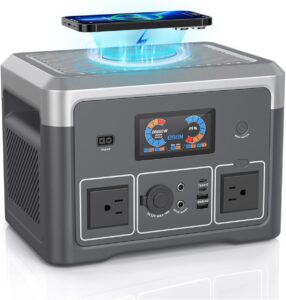

So you’ve got a portable power station as your sump pump backup – smart move! Now, let’s make sure you’re using it effectively and safely when the storms hit and the power quits. A portable power station (a big battery with AC outlets) can be a basement-saver, but there are some practical tips and tricks to ensure it does its job when called upon. From preparation and placement to extending runtime, this guide covers the key advice for using a portable power station to keep your basement dry during power outages.
Contents
1. Store It Charged and Ready
This seems obvious, but it’s crucial: always keep your power station at a full state of charge (or whatever the manufacturer recommends for standby). Check on it periodically, especially during storm season. Many units have an indicator – some even an app – showing battery percentage. The last thing you want is to pull out your backup and find it drained. Some power stations can be left plugged in indefinitely in a sort of UPS mode (they’ll keep the battery topped up). If yours supports that, it’s a great way to ensure it’s juiced up. Otherwise, set a reminder maybe once a month to top it off or at least verify charge.
Additionally, store it in a cool, dry place. Basements can be damp – you want to protect the unit from excessive humidity or any chance of water contact (ironic, yes – but you don’t want your backup sitting on a wet floor!). Keep it elevated, maybe on a shelf or mounting bracket on the wall. A unit like the EcoFlow or Jackery can be kept by the wall near the sump but off the ground. This prevents any minor leaks or moisture from reaching it. And as a bonus, higher placement means shorter extension cords to the pump (less voltage drop).
Remember, lithium batteries hold charge well, but if it’s going to sit for months, check it. A partially charged battery can lose capacity over long periods. So maintain it as per manual – whether that’s full charge or around 80% (some brands ship at 60-80% for storage).
2. Practice an Outage Drill
Don’t wait until it’s pouring rain and the power’s out to first use your power station with the sump pump. Do a test run. On a clear day, simulate a power outage: – Unplug your sump pump from the wall and plug it into the power station. – Perhaps switch off power station AC output then turn it on (simulating it kicking in). – Fill the sump basin with water (use a garden hose or pour buckets) until the float triggers the pump.
Observe: does the pump start promptly? Does the power station handle the surge without any overload alarms or cutouts? Most quality ones will, but it’s good to confirm. For example, you might see the wattage briefly spike on the display and then settle to the normal running watts. If the station has an overload indicator, make sure it doesn’t flash. If it does struggle, better to find out now – you may need a different approach or a larger unit.
Also, time how long the pump runs to clear a certain amount of water. This info can help later to estimate runtime if on battery (like if it pumps 10 seconds every minute, you know duty cycle is ~16%).
After the test, recharge the power station to full so it’s ready again. Now you also know the process of hooking it up. Make sure anyone else in the house who might need to do this (spouse, older kids) knows how to as well. Label things if necessary (like a tag on the pump plug “plug into battery during outage”).
3. Optimize What’s on the Power Station
During an outage, you might be tempted to plug other things into your power station – lights, phone chargers, maybe a dehumidifier. Prioritize your sump pump. That’s the critical load preventing costly damage. Ideally, dedicate the power station to just the pump during the emergency. Every extra device drawing power shortens how long the battery can last for the pump.
For instance, a dehumidifier might draw 200-500W – that could severely eat into capacity needed for the pump. And honestly, in a flood scenario, a dehumidifier is secondary. So, keep unnecessary loads off. If you absolutely have ample capacity, okay, but always leave a generous buffer.
If your power station has multiple output ports (most have a few AC outlets), avoid plugging in heavy loads on the same unit that might cycle with the pump. Two cycling loads could overlap and cause a surge above capacity. For example, don’t have a fridge on it that might kick on compressor at the same time as pump – that combined surge could trip it. If you have a separate smaller power bank for low-power stuff (like charging phones or a lamp), use that for those creature comforts and reserve the big unit for the sump.
4. Maximize Battery Life and Runtime
To get the most run-time from your power station for the sump, consider these tips: – Use Pump Efficiently: There’s not much you can change about how the sump pump uses power (aside from perhaps the float switch adjustment). But if you have the ability to adjust the float, you might let the water rise a bit higher so the pump runs less frequently but a bit longer each time (fewer on-off cycles can sometimes be more efficient). However, don’t raise it so high that you risk overflow or that your basement has more water sitting around. Just don’t have it pumping every 10 seconds in short spurts – that’s inefficient. – Cool Environment: Batteries last longer in cool (but not freezing) temps. If your basement is extremely hot, the battery might cut out sooner. Most basements are naturally cool, which is good. Just ensure the power station has ventilation (don’t box it in – it might have fans that kick in). – Solar / Recharge Plan: If the outage might be long and it’s daylight, you could rig solar panels if your unit supports solar charging. Some prepper folks keep portable panels to recharge their stations. Even a few hundred watts of solar input during the day can extend runtime a lot, essentially powering the pump directly from sun and saving battery for night. It’s something to consider if you’re in an area with frequent multi-day outages (and some sun in between storms). – Conserve Battery for Pump Only: We mentioned not plugging other things. Additionally, don’t keep the AC inverter on if not needed. Many power stations allow DC outputs (like USB) separate. Turning off AC output when the pump’s not running can save a bit of idle drain (inverter overhead). But if your pump is cycling every minute, you’ll likely keep it on. Some units might have an “eco mode” where they turn off AC if load = 0 for a while – could be risky with a pump (you don’t want it failing to detect a sudden load). – Have a Backup to the Backup: If you have a generator as a secondary measure, you could run the generator to recharge the power station once the immediate storm passes or if battery gets low. Or keep an extra battery module if your system supports it. Also, know the point at which you might need to manually intervene (like when to start bailing water with a bucket if absolutely everything fails – hopefully never).
5. Safety First
When using a power station in a wet environment like a basement during flooding potential, safety is key: – Keep Connections Dry: If you’re using extension cords, elevate them, keep plugs off the floor. Ideally, the power station sits where flood water cannot reach. If using a gas generator, of course keep it outdoors away from windows (carbon monoxide risk) and use a proper gauge extension cord to reach the sump. – Don’t Overload: Respect the wattage limits of your power station. If your pump is borderline for it (e.g., 1000W pump on 1000W inverter), be cautious. Most will shut off safely if overloaded, but you don’t want to repeatedly trip it – that could eventually cause wear or just leave your pump non-functional when it’s tripped. – Battery Gas (for DIY backups): This is more for those using car batteries/inverters, but if you were, ensure ventilation as lead-acid batteries can emit hydrogen gas when charging heavily. Most enclosed power stations use sealed batteries or lithium which don’t have that issue. – Fire Safety: Lithium power stations have multiple protections, but as with any electrical device, there’s a minor risk of malfunction. Make sure it’s placed where, if anything did go awry (like smoke or fire), it wouldn’t catch other things easily. This risk is low with quality units, but good practice. Avoid placing right next to flammable materials.
6. Know When to Pull the Plug
If power returns, switch your sump back to mains power if possible – save your battery for the next outage. Also, after the event, recharge your power station as soon as you can. If the outage is prolonged and you see your battery is at, say, 20% and dropping, and you have a generator available, it might be time to switch to generator to run the pump, reserving the last of battery as maybe a buffer for when refueling generator, etc. If no generator, and battery is nearly out, you might have to do the unthinkable – manual water removal (via hand pump or buckets) to give the pump and battery a break, especially if rain has slowed. It’s good to have a cheap utility hand pump or even a siphon hose as a worst-case tool.
7. Maintenance Mode After Use
After using the power station in an outage, do a quick check: – Did it perform as expected? Note anything odd. – Fully recharge it. – If it got a lot of discharge cycles, maybe check its battery health via app or self-test if available. – Clean it if any dirt or moisture got on it. Store it properly again. – If the outage was long, consider if your plan needs any upgrades (additional battery, solar, etc., for next time).
In conclusion, using a portable power station for your sump pump can be a relatively worry-free experience if you prepare and follow these tips. It’s like having a silent guardian in your basement: but even guardians need a little upkeep and understanding. With your power station charged up, tested, and optimized for pump duty, you can face the storm with confidence. While your neighbors might be fretting over rising water, you’ll hear the comforting hum of your sump pump still hard at work, powered by your foresight and that big orange (or blue or black) box of stored electricity. Stay dry and safe!